

A material list is only as dependable as the engineering data behind it. When teams manage takeoffs separately from structural design, repeated data entry and late revisions can leave drawings and bills of materials out of sync. Automated bill of materials software helps connect design information to coordinated material lists, giving structural teams a more controlled path from engineering work to project documentation.
Manual takeoffs may feel familiar, but they can make it harder to keep information aligned as a design changes. The answer isn’t simply another generic BOM tool. Structural workflows need software that reflects the systems being designed and coordinates material outputs with approval drawings and related documentation.
This article explains how design data can flow into a BOM, which capabilities matter when evaluating software for structural projects, and how material lists can work alongside approval drawings and load tables. It also explains the difference between engineering and manufacturing BOMs. GMatrix-7 provides specialized modules for metal building systems, open web steel joists, and light gauge steel, with automated bill of material and approval drawing generation. Automation supports a more coordinated workflow, but does not remove the need for design review.
Key Takeaways
- See how structural design information can feed material lists, then move through engineering review into coordinated project outputs.
- Learn why automated bill of materials software for structural engineering should reflect the systems being designed, rather than simply manage generic inventory.
- Compare specialist software and spreadsheet workflows by their data sources, revision handling, and ability to coordinate related documents.
- Use a practical checklist to assess whether BOM outputs align with approval drawings and your engineering review process.
- Explore how GMatrix-7’s MBS (IBC), OWSJ (SJI), and LGS (AISI) modules support distinct structural workflows with automated BOM and approval drawing generation.
What Automated Bill of Materials Software Does in Structural Engineering
Automated bill of materials software turns structured project and design information into an organized list of materials and components for a structural project. Rather than assembling each item as a separate manual task, the software uses defined design data to generate a material schedule for review and documentation.
A structural BOM is a project-specific record of components derived from engineering design data, not a general inventory list of stock on hand. An inventory list tracks what an organization holds; a structural BOM describes what the design calls for. The broader concept of BOMs, including their different types and uses, is outlined in What is a Bill of Materials?
That distinction matters because structural design and generic BOM management solve different problems. Inventory or procurement platforms typically organize stock, purchasing, or supply activity. Manufacturing BOMs can define how a product is assembled, including production sequencing. An engineering BOM, or EBOM, represents the product as designed. It can inform a manufacturing BOM, or MBOM, but the MBOM adds production-focused details beyond a design material list. Structural BOM generation focuses on turning structural design information into project-specific material documentation.
Structural engineers and detailers can use these outputs to support design review and drawing coordination. Fabricators and broader project teams may use the resulting documentation in their own workflows. The BOM serves as a shared reference, but its role and level of detail depend on the project and the people using it.
What information does a structural bill of materials contain?
A project list may identify components and include quantities, dimensions, and material descriptions. The fields and grouping depend on the structural system and project requirements. One workflow might organize items by assembly or member type, while another may use different categories. Interpret the list alongside relevant design information, drawings, and review procedures, rather than treating it as a stand-alone substitute for them.
Why automate a BOM instead of maintaining it manually?
Manual preparation can require engineers or detailers to enter information that is already represented in the design. Deriving a list from structured design data can reduce duplicate entry and help carry updated information into related documentation. When the design changes, teams can review and regenerate affected outputs within their workflow instead of relying solely on manually edited lists that may not reflect the latest revision.
Automation supports coordination, but it doesn’t eliminate errors or engineering responsibility. Project teams still need to review inputs, generated material information, and document revisions. The benefit is a more traceable connection between design decisions and material documentation, with engineering judgment guiding acceptance and use.
How Automated BOM Generation Turns Structural Design Data into Project Outputs
A structural BOM workflow begins with engineering context, not a blank material list. The project scope and structural system shape which design information is relevant and how generated components and quantities should be organized. Structured design inputs give automated BOM software the basis to produce material outputs that can be reviewed alongside project drawings and documentation.
From project definition to material-list generation
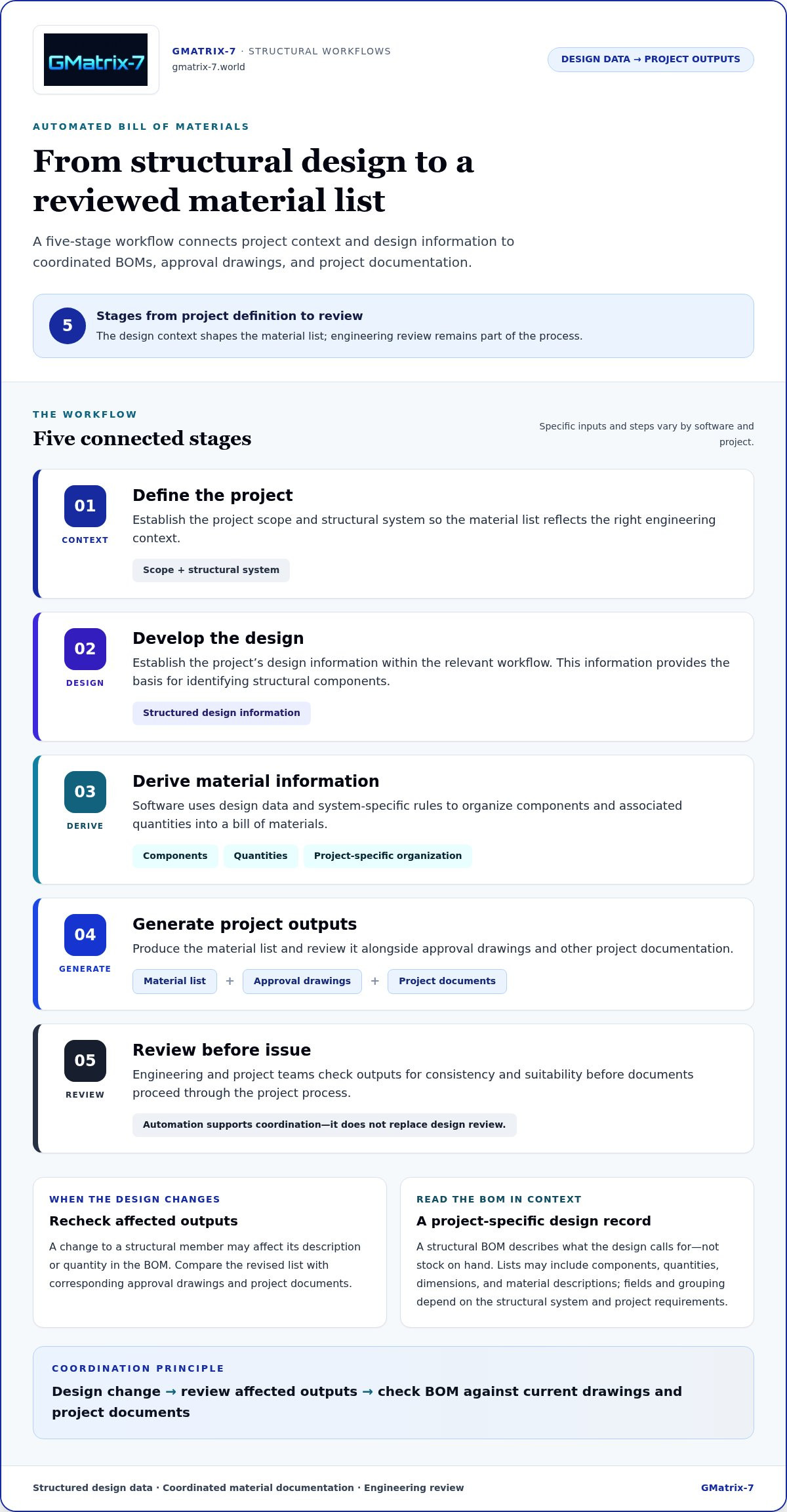
The specific inputs and steps vary by software and project, but a typical workflow follows this sequence:
- Define the project. Establish its scope and structural system so the material list reflects the right engineering context.
- Develop the design. Enter or establish the project’s design information within the relevant workflow. This information provides the basis for identifying structural components.
- Derive material information. The software uses design data and system-specific rules to organize components and associated quantities into a BOM.
- Generate project outputs. Produce the material list and review it alongside approval drawings and other project documentation.
- Review before issue. Engineering and project teams check the outputs for consistency and suitability before documents proceed through the project process.
For example, a change to a structural member may affect the component description or quantity shown in the material list. How the information is categorized depends on the structural system and project requirements, so teams should understand what the generated output represents before using it.
How revisions and engineering review fit into the process
Design changes should trigger a review of affected outputs. Compare the revised BOM with the corresponding approval drawings and project documents, checking that quantities and descriptions match the current design. This makes revision coordination an explicit step in the workflow, rather than assuming every document updates together.
Before issuing documents, qualified reviewers should verify the design inputs, material information, and drawing consistency. Automation can carry structured information into generated outputs, but it doesn’t replace engineering judgment or project review. Connecting design data to its documentation supports more traceable decisions throughout the process.
For a practical example of a structural workflow that generates material lists and approval drawings, explore GMatrix-7 structural design and BOM generation.
Automated Structural BOM Software vs. Generic BOM and Spreadsheet Workflows
Different tools organize material information around different kinds of work. Structural projects benefit from a clear connection between design context and project documentation. Generic BOM platforms may focus more on inventory, suppliers, assemblies, or production. Spreadsheets are flexible, but their connection to current engineering information depends on how carefully teams maintain and review them.
| Comparison area | Structural engineering workflow | Generic BOM platform | Spreadsheet workflow |
|---|---|---|---|
| Structural context | Organizes materials in relation to a defined structural system and its design process. | May organize products, assemblies, inventory, or production data across different industries. | Reflects categories and conventions users create and maintain. |
| Data source | Uses structured project and design information to inform material outputs. | Often centers on product records, purchasing, suppliers, or manufacturing data. | May rely on manually entered or copied information. |
| Revision handling | Supports a workflow for reviewing design changes against affected material outputs. | May provide revision controls for BOM records, depending on the platform and setup. | Tracking changes depends on file practices, version controls, and team discipline. |
| Related outputs | Can be assessed for coordination with approval drawings and relevant structural documentation. | May emphasize assembly, procurement, or production outputs. | Usually requires separate coordination with drawings and other project files. |
When a specialist structural engineering workflow matters
Structural systems have distinct design contexts. Metal building systems (MBS), open web steel joists (OWSJ), and light gauge steel (LGS) projects may organize design information and material requirements differently. A specialist workflow can make that context central to BOM generation. Depending on the project, teams may also need to review material lists alongside approval drawings or load tables, such as those for single-skin panels, sandwich panels, or composite decks. No single workflow automatically fits every system or organization.
What spreadsheets and general manufacturing platforms may leave separate
A spreadsheet can work for a team when its structure is clear and revision practices are consistent. The coordination burden grows when project lists are maintained separately from engineering information. Staff may need to repeat entries, reconcile changes, and make document status visible across files. General manufacturing platforms can offer useful BOM capabilities, but their priorities may be assemblies, supplier data, or production processes rather than structural design outputs.
Evaluate automated bill of materials software against actual project needs: the structural systems in scope, where material data originates, how revisions are reviewed, and which documents must align. Compare tools by testing their outputs and review steps, rather than assuming a specialist tool or general platform is right for every workflow.
How to Evaluate Automated Bill of Materials Software for Your Workflow
Assess software against the work your team performs and the documents it must deliver. Start with the structural systems, required outputs, and current project workflow. Then test whether the generated material information fits engineering review and document coordination.
- List the structural systems in scope. Separate requirements for metal building systems (MBS), open web steel joists (OWSJ), and light gauge steel (LGS). Don’t assume one workflow or output structure suits all three.
- Inventory the required documents. Record the material lists, approval drawings, and relevant load tables the project needs, including tables for single-skin panels, sandwich panels, or composite decks where applicable.
- Map the current process. Identify where design information originates, who prepares or updates material documentation, and how teams review and issue project documents.
- Define coordination criteria. Specify how quantities and descriptions should relate to the design, and how the BOM should be checked against approval drawings.
- Set revision expectations. Determine how users will recognize a design change, identify affected outputs, and distinguish current documents from earlier revisions.
- Assess output usability. Confirm that generated lists can be interpreted and reviewed by the people responsible for using them in the project workflow.
- Assign review responsibilities. Identify who checks quantities, descriptions, drawing consistency, and project-specific engineering decisions before issue.
Map software capabilities to project types and outputs
Turn the checklist into representative project scenarios. For an MBS project, define the material documentation and approval drawings your team needs. Repeat the exercise separately for OWSJ and LGS work, and include applicable load-table documentation. Record which outputs need engineering review, approval, and handoff so the evaluation reflects real project deliverables, not a generic feature list.
Assess usability, traceability, and professional oversight
Use a sample design change to examine how users can identify affected material information and related documents. Check whether the review process makes clear which quantities and descriptions need attention, who is accountable, and when revised documents are ready for use. Automation supports this process, but qualified professionals remain responsible for reviewing outputs and engineering decisions.
Before wider adoption, document acceptance criteria and test them against representative scenarios for each structural system. Compare the generated lists and drawings with the team’s established review requirements, note gaps, and agree on responsibilities. To see how these evaluation priorities relate to structural design and detailing workflows, explore GMatrix-7 structural capabilities.
How GMatrix-7 Connects Structural Design, Approval Drawings, and BOM Generation
After defining project requirements and review criteria, assess how a software workflow addresses the structural systems you work with. GMatrix-7 brings structural design workflows together with automated bill of material and approval drawing generation, connecting engineering information to project documentation. Its modules are organized around specific structural systems rather than treating every project as the same kind of BOM exercise.
Structural systems supported by GMatrix-7
GMatrix-7 provides distinct modules for metal building systems (MBS), open web steel joists (OWSJ), and light gauge steel (LGS). Each module is associated with a relevant design framework: MBS (IBC), OWSJ (SJI) bar joists, and LGS (AISI). This system-specific approach gives teams a workflow oriented to the structural application being addressed.
- MBS (IBC): Supports structural design workflows for metal building systems.
- OWSJ (SJI): Addresses open web steel joist and bar joist workflows.
- LGS (AISI): Supports light gauge steel design workflows.
These are distinct structural contexts, not interchangeable labels. The practical consideration is whether the module aligns with the system under design and the documentation the project requires.
From engineering workflow to coordinated documentation
GMatrix-7 automates bill of material generation alongside approval drawing generation. That connection matters because a material list is more useful when it can be reviewed in the context of related engineering documentation. Teams can assess the generated outputs together during project review, checking that the documents reflect the design information and current revision before issue.
GMatrix-7 also generates load tables for single-skin panels, sandwich panels, and composite decks. These capabilities extend the documentation workflow beyond the BOM to the named panel and deck applications. As with any engineering output, the project team remains responsible for review and professional decisions. Automation supports that process, but doesn’t replace it.
For teams evaluating automated bill of materials software, GMatrix-7 offers a structural engineering workflow spanning MBS, OWSJ, and LGS, with BOM and approval drawing generation. Explore GMatrix-7 structural engineering software to learn more about its capabilities.
Build a More Coordinated Structural Documentation Workflow
A structural BOM is most useful when it reflects engineering design information and is reviewed alongside related project documents. The right automated bill of materials software should fit the structural systems in scope, support revision review, and help teams coordinate material lists with approval drawings without replacing professional judgment.
GMatrix-7 brings together specialized modules for MBS (IBC), OWSJ (SJI) bar joists, and LGS (AISI) workflows. It automates BOM and approval drawing generation and provides load-table generation for single-skin panels, sandwich panels, and composite decks.
Explore how these capabilities fit your structural engineering workflow. Explore GMatrix-7 structural engineering software to take the next step toward more connected project documentation.
Frequently Asked Questions
What is automated bill of materials software?
Automated bill of materials software produces an organized material list from structured project or design information. In structural engineering, that list may identify components, quantities, dimensions, and material descriptions relevant to a particular system. Unlike an inventory list, a structural BOM represents what the design calls for, not simply what is in stock. Teams review the generated information within the project’s engineering and documentation process.
How does automated BOM generation work in structural engineering?
Automated BOM generation uses project scope and structural design information to organize components and quantities into a material list. The structural system provides context for how items are identified and grouped. Teams then review the generated BOM alongside relevant approval drawings and project documents. If design information changes, they should check affected outputs for consistency before issuing revised documentation.
Can automated BOM software generate material lists from structural design data?
Yes. Software designed for structural workflows can use structured design information to produce project material lists, rather than relying only on manual entry. The fields and groupings depend on the system and project requirements. GMatrix-7 provides automated bill of material generation within its MBS (IBC), OWSJ (SJI), and LGS (AISI) structural design modules. Teams remain responsible for reviewing the output against the design and related documents.
What is the difference between a BOM and a material takeoff?
A material takeoff generally focuses on identifying and quantifying materials required by a design. A bill of materials organizes components and associated information into a structured list for project use. The terms can overlap in practice, and the exact distinction depends on a team’s workflow and documentation standards. A structural BOM may include quantities alongside component descriptions and dimensions, while a takeoff may emphasize measured or counted quantities.
Does automated BOM software replace engineering review?
No. Automation helps produce and organize material information, but it doesn’t replace qualified engineering review or project-specific judgment. Reviewers should check that design inputs are appropriate and that generated quantities and descriptions align with the current design and related drawings. They should also confirm which revision is being reviewed before documents are issued. The software supports a disciplined workflow; professionals remain accountable for reviewing project outputs.
Can one structural BOM software workflow support MBS, OWSJ, and LGS projects?
A software platform can support multiple structural systems through distinct workflows or modules, but teams shouldn’t assume the requirements are identical. Metal building systems, open web steel joists, and light gauge steel have different design contexts and documentation needs. GMatrix-7 provides separate MBS (IBC), OWSJ (SJI) bar joist, and LGS (AISI) modules. Project teams should assess each workflow against its required outputs and review process.
How can approval drawings and a structural BOM stay coordinated?
Coordinate the BOM and approval drawings through a shared review process tied to the current design revision. When design information changes, identify affected outputs, then compare material quantities and descriptions with the corresponding drawings before issuing documents. Automated generation can help connect these outputs within a structural workflow, but teams still need clear revision practices and assigned review responsibilities. GMatrix-7 automates both bill of material and approval drawing generation.


