
The software with the longest feature list isn’t necessarily the right choice for your engineering team. The Best Cold-formed Design Software connects code-based design checks with the structural scope and project deliverables you actually need.
Choosing a platform can be difficult when some tools focus on individual members while others support broader light-gauge steel workflows. You also need to compare supported AISI editions and ASD, LRFD, or LSD methods with your project requirements, and determine whether design outputs can flow into approval drawings and material lists without unnecessary rework.
This guide compares cold-formed steel software using practical criteria, from component design to broader structural workflows, code coverage, and documentation. It also explains where GMatrix-7’s LGS design module fits, including automated approval drawing and bill of material generation. Use the comparison to build a shortlist around your engineering checks, project types, and required deliverables.
Key Takeaways
- Choose the Best Cold-formed Design Software by matching its design scope to your projects, from individual member checks to broader LGS workflows.
- Compare supported AISI editions and ASD, LRFD, or LSD methods against your engineering requirements. Treat these design approaches as distinct.
- Assess whether each tool’s analysis capabilities and outputs align with the member types, loading, and calculations your team needs.
- Shortlist options by mapping project types, required checks, documentation, and user roles before reviewing software adoption.
- Consider how GMatrix-7’s LGS (AISI) module works alongside automated approval drawings and bills of material, as well as load tables for specified panel and deck types.
What Makes Cold-Formed Design Software the Right Fit for Your Work?
The Best Cold-formed Design Software is defined by how well its capabilities match your engineering work, not by the length of its feature list. These applications support analysis and design of steel members formed from sheet or strip material. Their scope can range from individual member checks to broader structural workflows. For a foundational overview of Cold-formed steel (CFS), including its uses and development, see the general reference.
Start with the projects your team delivers. A tool suited to checking a beam or stud may not address the analysis, coordination, or documentation needed for an LGS project. Standards, calculation depth, member types, and required outputs all shape the fit. A single capability, such as checking an individual member, does not establish that software covers complete building design.
What engineering work can cold-formed design software support?
Depending on its scope, software may help engineers check member capacity, analyze framing, select sections, or complete project-specific structural calculations. For example, a structural engineer might use member checks to assess a stud under defined loading, while a design team may need framing analysis to understand how loads move through a larger assembly. Section selection can support early design decisions, and calculation outputs can document the basis of those decisions.
Match each task to the people responsible for it. Engineers may need traceable calculations and control over design assumptions. Detailers may need structural information that informs drawings, while project teams may need consistent outputs for review and coordination. Assess the limits of a tool’s analysis rather than assuming every application handles every member, load case, or system.
When does a component-design tool differ from an LGS workflow?
A component-design application centers on evaluating an individual member or defined assembly. A broader LGS workflow connects structural design with downstream project outputs. That distinction matters when a team needs more than a pass-or-fail check. Analysis may need to inform approval drawings, bills of material, or load tables, each serving a different review or project-planning purpose.
For instance, a member check can inform design decisions, while coordinated documentation helps communicate those decisions beyond the engineer who performed the calculation. Teams assessing this wider scope can explore LGS structural design software as a reference point. GMatrix-7’s LGS (AISI) module sits alongside approval drawing and bill of material generation, as well as load tables for single-skin panels, sandwich panels, and composite decks.
Use these distinctions to frame the comparison that follows: identify the engineering tasks, the required level of calculation detail, and the deliverables that must leave the design workflow.
How to Evaluate AISI Coverage, Analysis Methods, and Design Capabilities
A useful comparison starts with verifiable design coverage, not a broad “AISI compatible” label. Match the software to the standard edition and design approach specified for your project, then assess whether its analysis scope and calculation reports support the decisions your engineers must document. The Best Cold-formed Design Software should fit those requirements without leaving critical checks or assumptions unclear.
Which AISI S100 edition and design method does your work require?
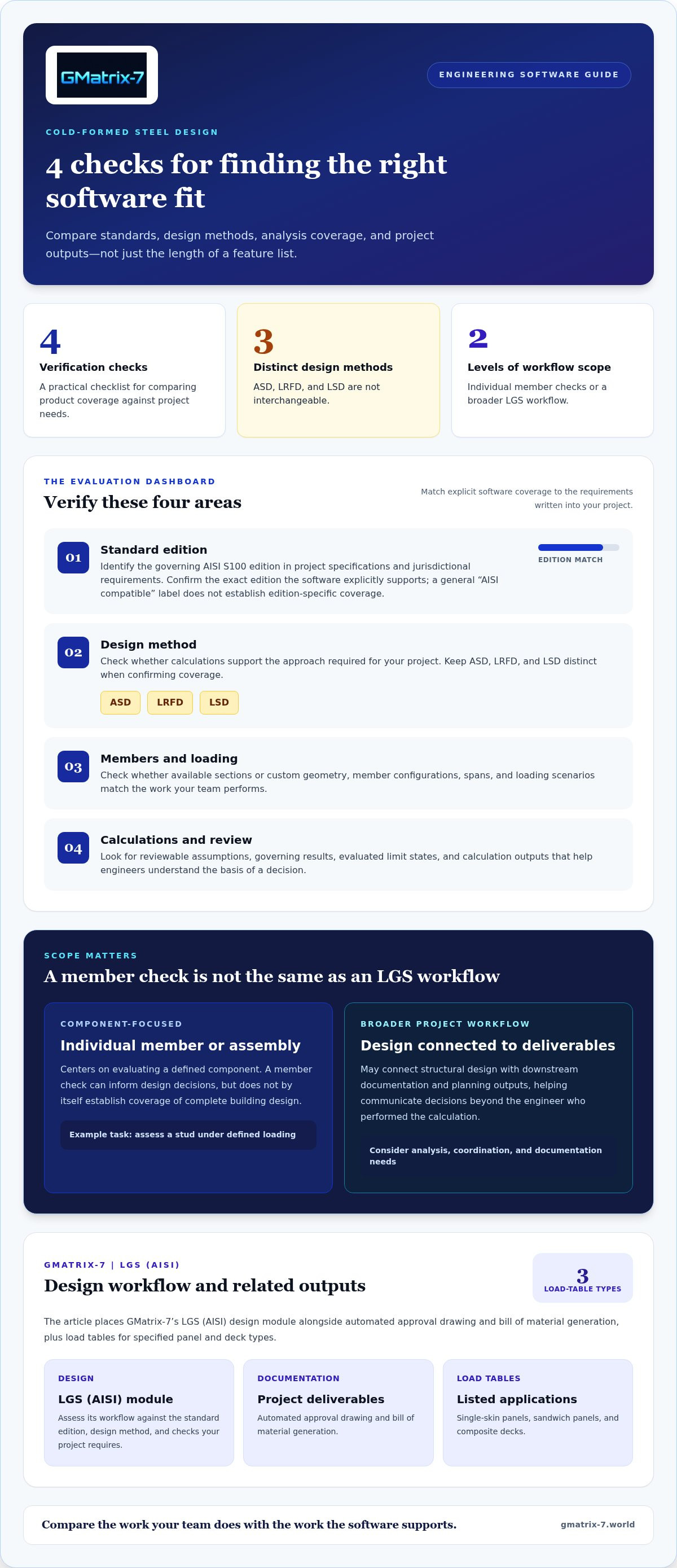
Record the governing standard edition in your project specifications and applicable jurisdictional requirements. Then compare it with the edition the software explicitly supports. A general AISI reference doesn’t establish edition-specific coverage. ASD, LRFD, and LSD are also distinct approaches: ASD evaluates service-level effects against allowable strengths, while LRFD and LSD use factored effects and resistance or limit-state criteria. They aren’t interchangeable, so select the method that aligns with the project basis.
Use a product-by-product verification checklist:
- Standard: Which AISI S100 edition is explicitly identified?
- Method: Are ASD, LRFD, or LSD calculations supported for the required checks?
- Members and loading: Do available member configurations and load cases match the project?
- Calculations: Can engineers review assumptions, governing results, and calculation outputs?
For GMatrix-7, the relevant comparison is its LGS (AISI) design workflow and the project requirements you have identified. Keep edition and design-method criteria separate from the broader question of how the software supports your structural work.
Do the analysis tools match your member and loading conditions?
Go beyond the section library. Compare whether the application supports the sections or custom geometry your team uses, the member configurations and spans in your projects, and the loading scenarios that govern design. Then review which limit states it evaluates and whether the calculation output makes assumptions and controlling results understandable to the engineer responsible for review.
Analysis labels alone aren’t enough. If a tool claims finite strip or buckling analysis, look for product documentation that identifies the method and its scope rather than inferring it from general design language. For broader context on evaluating CFS system analysis and design procedures, consult the NIST Guide for Practicing Engineers.
Once your criteria are clear, explore GMatrix-7 LGS capabilities as you assess how LGS design can fit your engineering workflow.
Cold-Formed Design Software Compared: Component Tools and End-to-End Workflows
These tools serve different points in the engineering workflow, so a feature-by-feature comparison is more useful than declaring one universal winner. The table summarizes the scope described for each product. Use it to identify which capabilities to weigh against your project requirements.
| Software | Design focus and standards | Analysis tools | Stated outputs |
|---|---|---|---|
| Simpson Strong-Tie CFS Designer | Member and framing examples, including beam-column design and common framing configurations. AISI-based checks are described; a specific supported edition is not stated in the reviewed extract. | Product information describes complex beam loading and span conditions, along with member checks. A broader building-system analysis scope is not stated in the reviewed extract. | PDF output and AutoCAD export for selected opening designs are described. |
| RSG CFS products | Component design with user-created cold-formed sections. The reviewed information names AISI S100-24 and earlier editions, plus ASD, LRFD, and LSD. | Analysis workflows include elastic buckling analysis using the finite strip method. | Design computations are described; approval drawing and bill-of-material automation are not stated in the reviewed extract. |
| GMatrix-7 LGS | LGS structural design under AISI. | LGS structural design. | Automated approval drawings and bills of material, plus load tables for single-skin panels, sandwich panels, and composite decks. |
How do component-focused CFS tools differ in documented scope?
Simpson Strong-Tie’s CFS Designer information emphasizes member checks and framing examples, with identified file outputs for selected designs. RSG’s described scope highlights custom section creation and finite strip buckling analysis. Those distinctions can guide a shortlist: a team focused on member calculations may prioritize analysis detail, while a team coordinating project documents may weigh deliverables more heavily. The Best Cold-formed Design Software depends on that project-level fit.
When should approval drawings and material outputs affect the comparison?
Design calculations inform engineering decisions, approval drawings communicate design intent, and bills of material organize project components. When engineering and documentation are both part of the workflow, assess whether the outputs connect rather than treating them as separate capabilities. GMatrix-7 combines LGS design with automated approval drawing and bill-of-material generation. For additional product context, see the AISI structural design tool guide. No single tool is right for every team, so compare documented scope against the checks and deliverables your projects require.
How to Shortlist Cold-Formed Design Software for Your Engineering Team
A reliable shortlist reflects how your team designs, reviews, and documents work. Separate mandatory technical requirements, such as governing standards and required checks, from workflow preferences like output convenience or ease of onboarding. This keeps attractive feature lists from obscuring a fundamental mismatch.
Which project requirements belong in a software shortlist?
Start with recurring project types, framing systems, member conditions, loading cases, and engineering documents. Map each project’s specified code edition and design method before comparing products. Include the engineers who perform checks, detailers who prepare drawings, and reviewers who rely on calculations or other deliverables. For additional detailing considerations, see this light gauge steel detailing tools guide.
Use this sample matrix to clarify needs before evaluating tools:
- Project types: Recurring LGS framing systems and project-specific structural scope. Users: engineers and project leads.
- Member checks: Required member conditions, loading cases, and calculation review needs. Users: structural engineers and technical reviewers.
- Documentation: Required calculation outputs, approval drawings, and bills of material. Users: engineers, detailers, and project reviewers.
- Adoption: User roles, training needs, and fit with current review and revision practices. Users: the full project team.
Treat code coverage, design methods, and essential checks as pass-or-fail criteria. Rank preferences such as interface familiarity, output convenience, or workflow flexibility separately. A preference can guide a close decision, but it shouldn’t outweigh a missing technical requirement.
How can teams compare workflow fit without relying on feature counts?
Apply a consistent five-step process:
- Define projects: Select representative work and identify recurring members, framing, and loading conditions.
- Map standards: Record required code editions and design methods from project specifications.
- Test analysis scope: Check whether the tool addresses the relevant member conditions and provides interpretable calculations.
- Review outputs: Trace design results into the drawings, material information, and other required documentation.
- Assess adoption: Consider how engineers, detailers, and reviewers will learn, use, and review the workflow.
Where access and project requirements permit, run the same representative case through each shortlisted option. Follow it from inputs through checks, calculation review, revisions, and final deliverables. This reveals practical gaps that a feature count can’t show. The Best Cold-formed Design Software is the option that meets your mandatory requirements and supports a workable team process.
Explore GMatrix-7 LGS structural design capabilities as you assess how design and project documentation can fit together.
Why Consider GMatrix-7 for Cold-Formed Structural Design?
GMatrix-7 is worth considering when your shortlist calls for LGS structural design alongside project documentation. Its capabilities include an LGS (AISI) module, automated approval drawing generation, and automated bills of material. The platform also generates load tables for single-skin panels, sandwich panels, and composite decks. These features make it relevant to teams assessing how engineering work connects with the documents used for review and project coordination.
Where does GMatrix-7 fit in an LGS engineering workflow?
Assess the LGS module against your required project scope, standards, and design methods, just as you would any candidate tool. Then consider how its broader capabilities align with your deliverables: approval drawings communicate design information, while bills of material organize project material details. Load tables provide another output for single-skin panels, sandwich panels, and composite decks.
This combination matters when your workflow extends beyond analysis to documentation. A design result must be reviewed and communicated, and the required outputs depend on the project. For wider comparison context, consult the precision structural engineering software buyer’s guide.
What should the final software decision demonstrate?
Make the decision against your shortlist, not a generalized ranking. Confirm that the selected tool aligns with your project standards and required design scope, and that its outputs support the deliverables your team actually prepares. Use a representative workflow to examine how inputs, engineering checks, and calculation review connect to approval drawings and material information. Review generated documentation with the people who will rely on it.
The Best Cold-formed Design Software is the one that meets your technical requirements and fits your team’s process. GMatrix-7’s LGS (AISI) module, automated approval drawings and bills of material, and load-table generation offer concrete capabilities to assess against those criteria. Explore GMatrix-7 structural design software to review its LGS solution and workflow outputs.
Choose a Workflow That Supports Your Next Project
The Best Cold-formed Design Software isn’t simply the tool with the most features. It’s the one that aligns with your project standards and design scope, handles the analysis your team requires, and supports the deliverables that carry engineering decisions through review. A structured shortlist and a consistent project test can help reveal that fit.
For teams assessing design alongside documentation, GMatrix-7 brings an LGS (AISI) structural design module together with automated approval drawing and bill-of-material generation. Its capabilities also include load tables for single-skin panels, sandwich panels, and composite decks. Evaluate these outputs against your project needs, and align the software’s documented standards coverage and design methods with your project basis.
Explore GMatrix-7 structural design software to see how its LGS capabilities support your engineering workflow. Make your next software decision with clear requirements and confidence in the deliverables your team needs.
Frequently Asked Questions
What is cold-formed steel design software?
Cold-formed steel design software supports engineering analysis and design of members or systems made from formed steel sections. Depending on the application, it may help engineers evaluate member capacity, analyze framing, select sections, or produce calculation outputs. Its scope varies: a component tool may focus on individual members, while a broader workflow may also support project documentation. Engineers remain responsible for selecting appropriate assumptions and reviewing design results.
Which software is best for cold-formed steel design?
The Best Cold-formed Design Software depends on your project types, required standards and design methods, analysis needs, and deliverables. Component-focused tools may suit teams prioritizing member checks, while broader LGS workflows may be relevant when documentation outputs matter too. Compare documented capabilities rather than relying on feature counts. GMatrix-7 is one option for LGS (AISI) structural design alongside automated approval drawing and bill-of-material generation.
Does cold-formed steel design software support AISI S100?
Some cold-formed steel design software supports AISI S100, but supported editions and design methods differ by product. A general statement of AISI compatibility doesn’t establish which edition or whether ASD, LRFD, or LSD is covered. Compare product documentation with the standard and method specified for your project. GMatrix-7 provides an LGS (AISI) module, which you can assess against your project’s requirements.
What is the difference between CFS member design software and LGS design software?
CFS member design software generally focuses on checking individual cold-formed steel members or defined configurations. LGS design software may address a broader light-gauge steel engineering workflow, depending on the product. That broader scope can include design work alongside project documentation such as approval drawings and bills of material. These labels alone don’t define exact capabilities, so compare each tool’s documented analysis scope, supported outputs, and fit with your project process.
Can cold-formed design software generate approval drawings and bills of material?
Yes, some software platforms include these documentation capabilities, but they aren’t universal features of every member-design tool. GMatrix-7 provides automated approval drawing generation and bills of material alongside its LGS (AISI) structural design module. It also generates load tables for single-skin panels, sandwich panels, and composite decks. Compare these outputs with your required deliverables, and review generated documents as part of your engineering workflow.
How should engineers compare cold-formed steel software?
Begin by listing project types, governing standard editions, design methods, member conditions, loading cases, and required calculations. Separate mandatory technical requirements from workflow preferences, then compare product documentation against each item. Where practical, test shortlisted tools with a representative project, tracing inputs through design checks, calculation review, revisions, and deliverables. Include engineers, detailers, and reviewers in the assessment so the final selection reflects both technical scope and team workflow.


