

The Best Open Web Steel Joists Design Detailing solution is not necessarily the one with the longest feature list. A more useful test is whether it supports your joist workflow from engineering work through approval drawings and material information, with clear review points along the way. Look for a fit with your project requirements and the way your team prepares and checks documents.
Comparing tools can be difficult when product descriptions blur the line between structural engineering, joist-specific design, detailing, and general drafting. To make a practical comparison, list the work your team needs to complete, the deliverables it must prepare, and where information currently has to be entered or reconciled more than once. Those details show whether a tool addresses a real workflow gap.
This guide provides a framework for evaluating OWSJ software, including design scope, standards context, approval drawings, and bill of material workflows. It also explains how GMatrix-7’s OWSJ (SJI) module supports structural design and detailing workflows, including automated approval drawing and bill of material generation. Use the criteria below to compare tools against your project needs and review procedures.
Key Takeaways
- Use the Best Open Web Steel Joists Design Detailing framework to assess whether a tool fits your project requirements, documentation process, and production needs.
- Map the path from project parameters through engineering review to final documentation to identify repeated entry and manual handoffs.
- Separate joist-specific design and detailing capabilities from general CAD functions, then assess each against the work your team needs to do.
- Keep qualified engineering judgment central: software-generated results and documents require appropriate professional review.
- GMatrix-7’s OWSJ (SJI) module supports a joist-focused workflow with automated approval drawings and bills of material.
What the Best Open Web Steel Joist Design and Detailing Software Should Solve
Open web steel joist (OWSJ) design and detailing software supports engineering work and project documentation across the joist workflow. Evaluate whether the tool helps carry project information from inputs through review and into usable deliverables, rather than treating calculations, drawings, and material information as unrelated tasks. The Open web steel joist overview provides background on the structural system. For software selection, focus on how the tool supports your engineering and documentation process.
Software can organize design information and assist with analysis, but it does not replace qualified engineering judgment. Engineers remain responsible for reviewing inputs, interpreting results, and approving project documents. The Best Open Web Steel Joists Design Detailing option is therefore not simply the tool that produces an answer. It should make the path from assumptions to reviewed outputs clear.
Which OWSJ workflow problems should software address?
Start by identifying where project information gets re-entered or separated. For example, when a design parameter changes, check how that revision is reflected in engineering records, drawings, and material documentation. If those tasks happen in disconnected workflows, the team has to reconcile information manually and determine which revision is current. That adds coordination work and makes discrepancies more difficult to identify.
Assess accuracy, traceability, and documentation through specific checks, rather than treating them as promised outcomes. Can reviewers see the inputs and revisions behind a deliverable? Is it clear which documents need updating after a design change? These questions expose workflow gaps that a broad feature list may not show.
What does design and detailing software contribute?
Design support concerns engineering inputs, analysis, and review of results. Detailing and documentation involve preparing project information for approval and downstream use, including drawings and material records. These functions are related, but one does not automatically provide the other. Compare the actual tasks supported at each stage.
Specialized OWSJ software connects joist-focused engineering tasks with project documentation, while general drafting tools primarily support the creation and editing of drawings. CAD tools can be part of a detailing workflow, and manual calculations may suit some processes. In either case, account for how information transfers between tools and who checks it. A connected workflow can reduce repeated entry and handoffs while preserving engineer oversight.
Make the comparison practical: trace a project input, such as a revised design parameter, through engineering review and into the relevant documentation. Record which steps are automated, which require manual updates, and who reviews each output. Clear, reviewable steps give your team a stronger basis for comparing tools and evaluating the Best Open Web Steel Joists Design Detailing fit.
How OWSJ Design Software Connects Engineering Inputs to Detailing Outputs
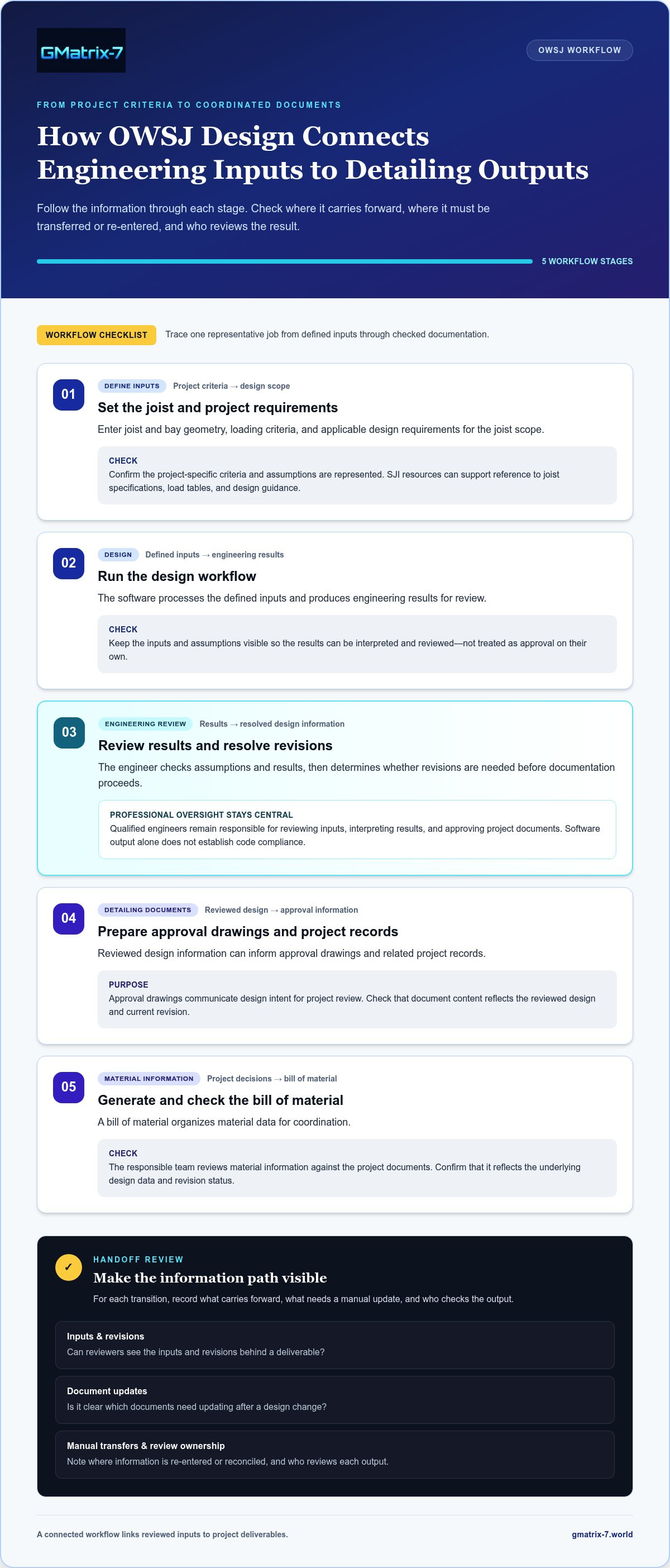
A useful OWSJ workflow makes each transition visible: project criteria inform engineering work, reviewed design information feeds documentation, and approval drawings and material records reflect project decisions. When comparing software, follow one representative job through each stage. Note where the same information carries forward and where your team must transfer, re-enter, or check it manually.
What information enters an OWSJ software workflow?
Typical inputs include joist and bay geometry, loading criteria, and applicable design requirements. Engineers establish and validate assumptions, confirm that project-specific criteria are represented, and review how the software processes the information. Resources from the Steel Joist Institute (SJI) can support reference to joist specifications, load tables, and design guidance. Software output still requires qualified professional review; generated results alone do not establish code compliance.
How do design decisions become drawings and material information?
Use this sequence to check how information moves from project criteria into documentation:
- Define project inputs. Enter the geometry, loading criteria, and applicable requirements for the joist scope.
- Run the design workflow. The software processes the defined inputs and produces engineering results for review.
- Review and resolve. The engineer checks assumptions and results, then determines whether revisions are needed before documentation proceeds.
- Prepare detailing documents. Reviewed design information can inform approval drawings and related project records.
- Generate and check material information. A bill of material organizes material data for coordination. The responsible team reviews it against the project documents.
Approval drawings communicate design intent for project review, while bills of material organize associated material information. Both depend on the underlying design data and revision status. A connected workflow links reviewed inputs to these deliverables, helping teams coordinate around consistent project information. The team still needs to check the documents against the approved design.
In short, an OWSJ workflow takes project geometry, loading criteria, and design requirements through engineering work and review, then uses the reviewed information to prepare approval drawings and material documentation. Use that sequence to compare the Best Open Web Steel Joists Design Detailing tools: can your team trace a design decision into the records used for project coordination?
For an example of a specialized joist workflow, explore GMatrix-7 OWSJ software, which includes an OWSJ (SJI) bar joist module and automated approval drawing and bill of material generation.
How to Compare OWSJ Design and Detailing Software
Compare tools by the work they support, not by feature counts or broad claims. The Best Open Web Steel Joists Design Detailing choice depends on how well a workflow connects engineering scope, drawing preparation, material documentation, and review. Use the same representative project to assess each option, then record what the software handles and what remains manual.
Which capabilities matter in an OWSJ software comparison?
Separate engineering support from documentation. A tool may support joist-focused design tasks without generating approval drawings or material information. Another may prepare drawings while relying on separate calculations. Evaluate each function on its own, then examine how information passes between them.
| Comparison area | Specialized OWSJ workflow | General CAD-centered workflow |
|---|---|---|
| Engineering scope | Assess whether joist-specific design inputs and engineering work fit the team’s process. | Identify which engineering tasks take place outside the drafting environment. |
| Detailing outputs | Check whether the workflow supports preparation of joist-related drawings. | Assess drafting flexibility and how design information is brought into drawings. |
| Documentation | Determine whether material information connects to reviewed design data. | Identify whether material records require separate preparation or transfer. |
| Workflow fit | Map review, revisions, and handoffs across project stages. | Account for existing tools, manual coordination, and file or data transfers. |
For each category, record which tasks are supported, which are automated, and which remain manual. Then test a revision: if an engineer changes a design input, can the team identify where that change must be reviewed and reflected in drawings and material records? This reveals whether a tool supports useful data continuity without assuming that generated outputs are automatically correct or approved.
How should teams compare specialized software with general CAD?
Specialized OWSJ software is built around joist-related engineering and documentation functions. General CAD emphasizes adaptable drawing creation. Neither label alone determines fit. Consider engineering requirements, drafting flexibility, current team processes, and the effort needed to transfer information between design, drawings, and material lists.
For standards-focused context, consult the SJI-compliant joist design guide, and see steel joist detailing automation for a deeper look at connected workflows. Use these resources alongside your own comparison, and keep professional review central to the evaluation.
A Practical Checklist for Selecting OWSJ Design and Detailing Software
A structured evaluation starts with your current process, not a software feature list. Record how a typical joist project moves from engineering inputs through review, drawing preparation, and material documentation. This baseline helps your team identify workflow needs, compare tools consistently, and plan implementation without overlooking professional oversight.
What should teams map before evaluating software?
Document recurring project types and the tasks, documents, and handoffs each requires. Separate essential capabilities from useful extras so the selection criteria stay tied to day-to-day work.
- Project scope: Note representative joist projects, engineering tasks, and project-specific design assumptions.
- Deliverables: Identify drawing requirements, approval stages, and material documentation needs.
- Handoffs: Record where teams re-enter information, transfer files, or reconcile revisions manually.
- Controls: Map who reviews inputs and outputs, how assumptions are recorded, and how teams identify current revisions.
- Priorities: Mark which capabilities are essential and which would be beneficial but are not workflow-critical.
This process map helps show whether a tool addresses a real gap or adds another step. For standards-related background, consult the SJI 100-2020 design software reference alongside the requirements established for your projects.
How can teams assess fit without skipping engineering review?
Use representative project scenarios to evaluate fit with established procedures. Follow a project through input setup, result review, drawing preparation, and material documentation. Check that engineers can inspect assumptions, outputs, and revisions, and define who owns each review and approval step.
Before rollout, assign implementation responsibilities and identify training needs for engineers, detailers, and other users. A clear plan helps teams establish consistent use while preserving the review controls their work requires.
Use the Best Open Web Steel Joists Design Detailing criteria to compare tools against documented needs, not assumptions about what automation can do. GMatrix-7 provides an OWSJ (SJI) bar joist module, automated approval drawing generation, and bill of material creation. Explore GMatrix-7 OWSJ software to assess how its specialized workflow could fit your project process.
How GMatrix-7 Supports OWSJ Design and Detailing Workflows
After establishing your evaluation criteria, consider how a dedicated tool connects OWSJ engineering work with project documentation. GMatrix-7 provides an OWSJ (SJI) bar joist module as part of its structural design and detailing software. The module is relevant to teams comparing joist-focused software and looking at how design workflows connect with approval drawings and material records.
Where does the GMatrix-7 OWSJ module fit?
GMatrix-7’s dedicated module provides an OWSJ-focused option for joist design and detailing workflows. The platform automates approval drawing generation, supporting the documentation stage of the process. Teams can review how generated drawings fit their approval procedures and how project information is represented in those documents.
Automated bill of material generation supports material documentation and coordination alongside approval drawings. These capabilities give teams concrete outputs to assess when comparing connected workflows. Review each output against project information and revision status as part of the engineering and documentation process.
GMatrix-7 is an engineering tool, not a replacement for qualified professional judgment. Engineers retain responsibility for project assumptions, reviewing results, and determining whether outputs are appropriate for the project. Automation supports the workflow; it does not independently establish that a design meets applicable requirements.
What are the next steps for evaluating the workflow?
Return to your team’s documented requirements and compare them with the capabilities discussed in this guide. Trace a representative project through the steps that matter to your process: engineering work, review, approval drawing preparation, and material documentation. Note where information connects and where your procedures still require a manual handoff. That comparison gives the Best Open Web Steel Joists Design Detailing decision a practical basis grounded in your team’s needs.
For focused product context, read about OWSJ bar joist detailing software. Then take the next step: Explore GMatrix-7 structural design software.
Choose a Workflow That Carries Design Through to Documentation
The right OWSJ tool should fit your engineering process and make the path from design inputs to reviewed project documents clear. Compare specialized joist capabilities, drawing and material outputs, and the handoffs your team still manages manually. Keep qualified engineering review central: software supports decisions, but it does not replace professional judgment.
Use your documented project requirements to identify the Best Open Web Steel Joists Design Detailing fit for your team. GMatrix-7 provides a dedicated OWSJ (SJI) bar joist module, automated approval drawing generation, and bill of material creation to support connected engineering and documentation workflows.
Explore the platform’s capabilities and assess how they align with your project needs. Explore GMatrix-7 structural design software and take a next step toward a workflow that supports your team from design through documentation.
Frequently Asked Questions
What is open web steel joist design and detailing software?
Open web steel joist design and detailing software supports engineering tasks and project documentation for OWSJ systems. Depending on its capabilities, it may help teams work with design inputs, review analysis results, prepare approval drawings, or organize material information. These functions may be integrated or handled in separate tools. Engineers remain responsible for checking project assumptions and reviewing outputs before they are used in project documents.
How do I choose the best OWSJ design and detailing software?
Choose software by tracing a representative project from engineering inputs through review, drawings, and material documentation. Compare its OWSJ design scope, supported deliverables, revision handling, and fit with your team’s procedures. Identify which steps are automated and which remain manual. The Best Open Web Steel Joists Design Detailing solution should support the workflow your team needs while preserving clear engineering oversight and control of project assumptions.
Can OWSJ software generate approval drawings and bills of material?
Yes. GMatrix-7 automates approval drawing generation and bill of material creation, connecting its structural design and detailing software with project documentation. Treat each output as a document for review, not as a substitute for checking design information, revisions, and material details. Include the outputs in your team’s documentation and coordination review process.
Does OWSJ design software replace structural engineer review?
No. OWSJ software supports engineering work, but it does not replace qualified structural engineer review. Engineers must assess project-specific inputs and assumptions, interpret results, and review relevant documentation before relying on software outputs. A sound workflow makes these review points visible and helps teams track revisions. Automation can support calculations and document preparation, but it does not independently establish that a design is appropriate or meets applicable project requirements.
What is the difference between OWSJ software and general CAD software?
OWSJ software is intended to support joist-related engineering workflows and may connect design information with detailing documents. General CAD software primarily provides tools for creating and editing drawings. CAD can offer drafting flexibility, but engineering analysis or material documentation may be managed separately. Compare the functions your team needs, including how information moves between calculations, drawings, and material records, rather than assuming either category covers every project stage.
How does SJI relate to open web steel joist software?
The Steel Joist Institute (SJI) publishes industry specifications and technical resources relevant to steel joist design and construction. OWSJ software may support joist workflows associated with SJI guidance, but capabilities vary by product and configuration. For a project, engineers should identify the applicable requirements and verify that the software’s supported design basis matches them. Software outputs still require appropriate professional review; a product label alone does not establish project compliance.


