

What if the greatest structural design risk isn’t a calculation error, but a sound decision that never makes it from the design inputs into the drawings and material schedule? Effective structural design risk management makes engineering decisions traceable, especially when assumptions change and revisions move through a project.
Design teams know that calculations, drawings, and schedules need to stay aligned. The challenge is maintaining that alignment consistently while preserving the engineering judgment software can’t replace. Automation can support repeatable workflows, but it still needs defined controls and appropriate review.
This article presents a practical framework for identifying, assessing, controlling, and documenting design risks. You’ll learn how to strengthen traceability from inputs to deliverables, manage revision-related gaps, and evaluate specialized software as one part of quality control, not a substitute for engineering oversight.
Key Takeaways
- Use a repeatable structural design risk management process to connect project inputs, identified hazards, selected controls, and documented decisions.
- Set risk ratings and acceptance criteria according to project procedures and the responsible engineer’s judgment, rather than relying on a generic scoring system.
- Compare manual and software-supported workflows by how they handle input control, revisions, documentation, and reviewability. Neither replaces engineering checks.
- Assign clear responsibilities, retain evidence at each workflow stage, and define when issues must be escalated for review.
- Evaluate specialized tools against your team’s requirements. GMatrix-7 modules for MBS (IBC), OWSJ (SJI), and LGS (AISI) can connect design work with outputs such as approval drawings and bills of material.
What Structural Design Risk Management Covers, and Where Risk Enters
Structural design risk management is the process of identifying uncertainties in a structural design, assessing their potential consequences, applying appropriate controls, and documenting decisions. It helps teams make risks visible and reviewable. It doesn’t eliminate risk or replace the responsible engineer’s judgment.
The focus is specific. Design risk concerns engineering inputs, assumptions, analyses, and the accuracy and coordination of technical deliverables. Construction safety addresses hazards to workers during construction. Project delivery risk concerns matters such as schedule and coordination, while general business risk includes financial or organizational exposure. These categories can interact, but each calls for distinct controls and responsibilities.
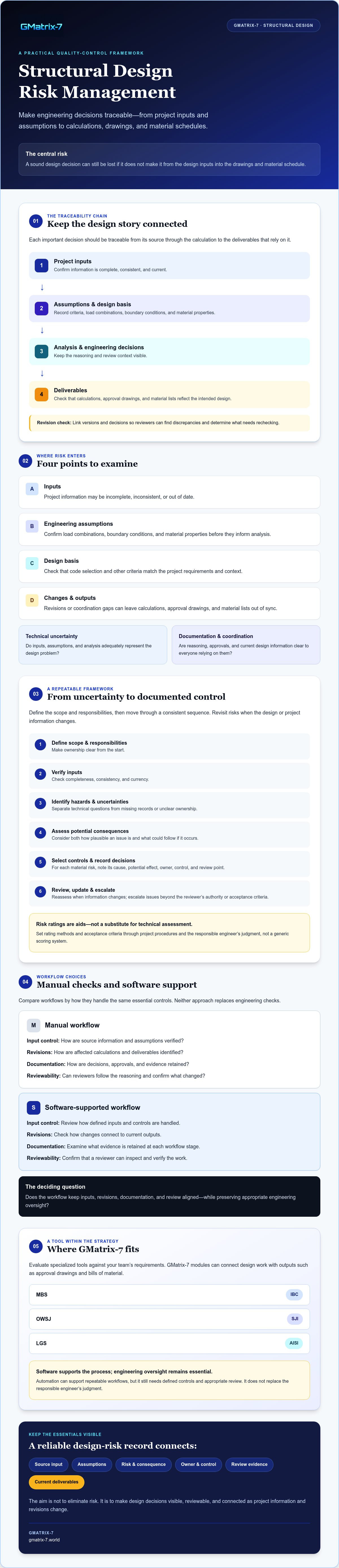
Risk can enter at several points in the design process:
- Inputs: Project information may be incomplete, inconsistent, or out of date.
- Engineering assumptions: Load combinations, boundary conditions, and material properties may need confirmation before they inform analysis.
- Design basis: Code selection and other criteria need to match the project’s requirements and context.
- Changes and outputs: Revisions or coordination gaps can leave calculations, approval drawings, and material lists out of sync.
These exposures fall into two connected groups. Technical uncertainty concerns whether inputs, assumptions, and analysis adequately represent the design problem. Documentation and coordination risk concerns whether the reasoning, approvals, and current design information remain clear to everyone relying on them. Understanding structural integrity and failure provides useful background on why sound structural decisions matter. Project teams still need to identify and manage their own design-specific uncertainties.
Which structural design risks should teams identify first?
Start with the inputs that shape the analysis. Confirm that project information is complete and internally consistent, then identify assumptions that could materially affect design decisions. Review load combinations, boundary conditions, and material properties against the documented design basis. Keep unresolved technical questions distinct from missing records, unclear ownership, or coordination issues. This makes it easier to assign the right reviewer and control to each concern.
Why traceability matters from calculation to deliverable
Each important design decision should be traceable from its source input and documented assumption through the calculation to the related approval drawing and material list. Documented assumptions give engineering reviewers the context they need to assess calculations and confirm that deliverables reflect the intended design. A revision mismatch between these records is a coordination risk to check for, not an inevitable feature of every project. Clear links between versions and decisions help reviewers locate discrepancies and determine what needs rechecking.
Build a Structural Design Risk Framework Around Inputs, Checks, and Reviews
A repeatable framework turns structural design risk management from a general intention into a sequence the team can apply and document. Define the design scope and responsibilities first. Then verify inputs, identify hazards and uncertainties, assess potential consequences, select controls, record decisions, and review risks as the design or project information changes.
Keep each step visible. For every material risk, record its cause, potential effect, assigned owner, chosen control, and review point. Risk ratings can help teams prioritize attention, but likelihood and consequence scores are aids, not substitutes for technical assessment. Set rating methods and acceptance criteria through project procedures and the responsible engineer’s judgment.
How to assess and prioritize design risks
Consider both how plausible an issue is and what could follow if it occurs. For example, if a project input describing a support condition changes after an initial analysis, identify which calculations, assumptions, and related outputs may be affected. Assign an engineer to assess the change, define any required recalculation, and confirm the result at a specified review point. Escalate the issue under project procedures if its implications exceed the reviewer’s authority or acceptance criteria.
This approach avoids treating every open item as equal. A minor documentation gap may need clarification, while an uncertain input that could change the structural response may warrant prompt technical review. Record why a risk received its priority and what evidence will close it.
How codes, assumptions, and reviews fit together
Project requirements should establish the applicable governing codes and editions. The design team should confirm jurisdictional and scope-specific applicability before relying on them. IBC, SJI, and AISI are relevant examples in some structural design contexts, but their relevance depends on the project and the work being designed. Code selection must be explicit, project-specific, and reviewable. Record the basis, confirm related design assumptions, and revisit the selection if project requirements change.
Reviews also serve different purposes. An independent check examines defined calculations or design work separately from its preparation. A peer review brings another qualified perspective to the design approach, assumptions, or broader technical issues. Software verification addresses whether a tool or calculation workflow produces results consistent with its intended use and documented checks. Don’t assume one replaces another. Set their scope and responsibility in project procedures.
Teams assessing digital support can compare their requirements with structural engineering software modules, while confirming applicable codes, review needs, and workflow fit rather than assuming automation establishes compliance.
Manual Checks vs. Structural Design Software: Compare the Risk Controls
Manual workflows and specialized software can both support sound engineering checks, but they manage information differently. Manual methods offer flexibility and can suit project-specific analysis. Their consistency depends on documented procedures, controlled inputs, and disciplined checking. Software can standardize defined calculations or generate technical documents, but only within the tasks and conditions it supports. Neither approach removes the need for qualified engineering review.
Compare the controls your team needs, not just the tools’ headline features.
| Risk control | Manual workflow | Software-supported workflow |
|---|---|---|
| Repeatability | Relies on consistent templates, methods, and staff procedures. | May apply defined methods consistently when configured and used correctly. |
| Input control | Inputs can be checked directly, but teams need a reliable process to record and verify them. | Confirm which inputs are required, how they are entered, and whether errors or omissions are apparent. |
| Change visibility | Changes may require manual comparison across files and records. | Ask how revisions are identified and tracked. Don’t assume the tool provides revision control. |
| Documentation | Calculations and deliverables depend on consistent preparation and filing. | Some tools generate drawings, lists, or reports. Verify the outputs and documentation available. |
| Reviewability | Reviewers need access to the method, inputs, and calculation records. | Check whether reviewers can inspect assumptions, results, and supporting records. |
| Limitations | Flexible, but vulnerable to inconsistent execution or missed cross-checks. | Bound by supported functions, configuration, inputs, and user interpretation. |
What engineering software can control, and what it cannot
Automation can make defined tasks more repeatable and support the production of technical documentation. It can’t be assumed to identify every incorrect assumption, interpret every project requirement, or independently confirm that an output is suitable. Qualified reviewers must assess generated calculations and documents against the project’s design basis and requirements. For a focused comparison of drafting tools and purpose-built systems, see CAD vs specialized software for steel detailing.
A practical software evaluation matrix for engineering teams
Before selection, document your requirements and ask vendors or internal technical leads to demonstrate them. Check support for the structural systems and standards relevant to the project. Verify code editions and jurisdictional applicability rather than inferring them from a module name. Assess how reviewers can inspect generated approval drawings, material lists, and load tables, where applicable.
Also ask how the workflow handles software versions, team training, integration with existing processes, and evidence of verification or validation. Confirm which review, audit-trail, and revision-management features are available. These checks make software evaluation part of structural design risk management, with automation treated as a workflow control, not a substitute for engineering judgment.
Apply Risk Controls Across the Structural Design Workflow
Make structural design risk management part of the project sequence, not a final check before documents leave the team. Assign an owner at each gate, retain evidence of the review, and define in advance what must be escalated. Roles vary by organization, so align responsibilities with project procedures and the responsible engineer’s authority.
- Project setup: The project engineer or design lead confirms scope, governing requirements, inputs, and responsibilities. Retain the design basis, input register, and open-item log. Escalate conflicting or missing information that could affect the design.
- Design development: The engineer responsible for the work checks assumptions, calculations, and changes to inputs. Keep calculation records and a log linking each material change to affected work. Escalate changes with unresolved technical implications.
- Independent review: The assigned independent checker reviews work within the agreed scope. Retain review comments, responses, and closure evidence. Escalate unresolved comments or findings outside the checker’s remit.
- Revision control: The design lead or document control owner verifies that current calculations and deliverables share consistent revision identifiers and approval status. Retain the change log and comparison results. Escalate uncertain document status or mismatched revisions.
- Issue: The designated approver confirms that the release set is complete and coordinated. Retain the approved issue record and list of released documents. Pause release and escalate any unresolved discrepancy.
Create review gates that catch changes before release
Set review points for inputs and assumptions, calculation development, independent checking, and final coordination. At each gate, record what changed, who reviewed it, the decision made, and which outputs may be affected. Review depth should reflect project risk and applicable quality procedures. A change that affects a design assumption may require more than a document-only check.
Keep technical documentation aligned through revisions
Before issue, compare current calculations with approval drawings, bills of material, and load tables where applicable. Confirm that each document represents the same design basis and revision, and that superseded versions can’t be mistaken for the release set. If a calculation change affects a member or component, trace its consequences through relevant drawings and material information. If a load-table input changes, confirm that the related table is reviewed and updated as needed.
Use a controlled change log to connect the initiating change, technical review, affected outputs, and approval status. Unresolved discrepancies are a reason to pause release and escalate, not to rely on informal clarification. For broader workflow context, read about professional structural design automation. Teams assessing automation can review GMatrix-7 drawing and material generation against their own coordination and review requirements.
Where GMatrix-7 Fits in a Structural Design Risk Management Strategy
Once a team has defined its risks, review gates, and software evaluation criteria, it can assess whether specialized tools fit the work. GMatrix-7 offers modules for Metal Building Systems (MBS, IBC), Open Web Steel Joists (OWSJ, SJI), and Light Gauge Steel (LGS, AISI). These labels identify the available modules, but they shouldn’t be treated as proof that a particular code edition or jurisdiction is supported. Confirm applicability for each project directly.
Match specialized modules to structural work and deliverables
Evaluate a module against the structural system your team designs and the technical outputs it needs to coordinate. GMatrix-7 can automate approval drawing and bill of material generation. It can also generate load tables for single-skin panels, sandwich panels, and composite decks. These capabilities can help connect design work with corresponding deliverables, but they don’t guarantee that documents are correct, coordinated, or compliant. Project-specific engineering review remains essential.
Questions to resolve before evaluating or adopting software
Use a defined checklist to determine whether the platform fits your workflow. Ask:
- Does the relevant module address the structural system and project types the team handles?
- Which standards, code editions, and jurisdictions apply, and can the vendor confirm support for those specific requirements?
- Can the software produce the required approval drawings, bills of material, or load tables in formats that fit the team’s deliverable process?
- How can users inspect assumptions, inputs, and generated outputs before approval?
- What options are available for review, design revisions, and version management? Confirm the specific features rather than assuming they’re included.
- What training, integration, and validation evidence would the team need before using the software in controlled project work?
Assess the answers against documented team requirements. A strong fit should support the workflow without obscuring the design basis or weakening established review controls. That distinction is central to structural design risk management: software can support repeatable tasks and document production, while qualified professionals remain responsible for interpreting requirements and reviewing design decisions.
After defining your criteria, explore GMatrix-7 structural design software and compare its modules and deliverables with your project needs.
Make Traceable Design Decisions the Standard
Strong structural design risk management connects verified inputs and documented assumptions to calculations, reviews, revisions, and issued deliverables. A repeatable process helps teams identify what needs attention, assign responsibility, and resolve discrepancies before release. Software can support consistency and documentation, but engineering judgment and qualified review remain essential.
Choose tools against your actual workflow requirements. GMatrix-7 offers specialized modules for MBS (IBC), OWSJ (SJI), and LGS (AISI), along with automated approval drawing and bill of material generation. It also generates load tables for single-skin panels, sandwich panels, and composite decks. Confirm applicable standards, jurisdictions, output needs, and review features as part of your evaluation.
If these capabilities align with your team’s requirements, explore GMatrix-7 structural design software. With clear controls and accountable review, engineering teams can build a more consistent, traceable design workflow.
Frequently Asked Questions
What is structural design risk management?
Structural design risk management is the process of identifying design uncertainties, assessing their potential consequences, applying appropriate controls, and documenting decisions. It covers issues such as incomplete inputs, unverified assumptions, analysis choices, and coordination between calculations and deliverables. The aim is to make risks visible and reviewable, not to promise their elimination. Clear records help responsible engineers and reviewers understand the design basis and evaluate how decisions affect the project.
How do structural engineers assess design risk?
Structural engineers identify potential issues, examine their likelihood and consequences, then prioritize them using project procedures and professional judgment. For example, if a support condition changes, the team can trace which assumptions and calculations may be affected, assign an engineer to assess the impact, and define a review point. The risk record should capture the issue, owner, control, evidence needed for closure, and escalation path. A numerical score supports prioritization but doesn’t replace technical assessment.
Can structural design software reduce engineering risk?
Software can support structural design risk management by standardizing defined tasks and helping teams produce consistent technical documentation. Its value depends on appropriate configuration, accurate inputs, and review of the resulting work. A tool can’t be assumed to identify every incorrect assumption, interpret all project requirements, or replace independent checking. Teams should verify how software handles the tasks they need and establish qualified review of calculations and deliverables within their quality procedures.
What are the most common risks in structural design?
Common design exposures include incomplete or inconsistent project inputs, assumptions that aren’t verified, unsuitable load cases or boundary conditions, and unclear material properties. Selecting a code or edition without confirming project and jurisdictional applicability can also create uncertainty. Changes may introduce coordination risks if calculations, drawings, bills of material, or load tables don’t reflect the same design revision. Teams can reduce gaps by documenting the design basis and checking dependencies at defined review points.
How should design changes be controlled in structural engineering?
Record each material change in a controlled log that identifies what changed, why, who assessed and reviewed it, and which calculations or deliverables may be affected. Assign an owner to determine whether analysis or documentation needs updating. Before issue, compare current calculations, drawings, and relevant material schedules or load tables using clear revision identifiers and approval status. Pause release and escalate unresolved discrepancies according to project procedures rather than relying on informal clarification.
Does structural design software guarantee code compliance?
No. Software doesn’t guarantee code compliance. Teams must confirm which standards and code editions apply to the project and jurisdiction, then verify that the selected tool supports the relevant requirements. Users also need to provide appropriate inputs, configure the workflow correctly, and review outputs against the project’s design basis. Check specific software capabilities and applicability with the vendor, and retain the qualified engineering review required by project procedures.
What should engineers look for when comparing structural design software?
Compare software against the structural systems, standards, code editions, jurisdictions, input requirements, and deliverable formats relevant to your projects. Ask how reviewers can inspect assumptions and outputs, and how the workflow handles revisions, version management, integration, training, and validation evidence. For example, GMatrix-7 offers modules for MBS (IBC), OWSJ (SJI), and LGS (AISI), plus approval drawing, bill of material, and specified panel and deck load table generation. Verify applicability and features directly.


