
A bill of material can pass a manual check and still conflict with the approved drawings. Avoiding bill of material inaccuracies starts with tracing each item to its design source and confirming that everyone is working from the same revision. A missed change or incomplete material detail can affect estimating, procurement, fabrication, and project coordination.
These risks are familiar to engineering and detailing teams. Rechecking spreadsheets line by line takes time, and without a clear record of what was reviewed, it can be hard to locate where a discrepancy entered the workflow. Accuracy depends on controlled inputs, traceable revisions, and deliberate review, not automation alone.
This checklist explains how to verify BOM completeness and consistency, trace errors through the engineering and fabrication process, and strengthen documentation controls. It also covers how automated BOM generation can reduce repeated manual transfers between design and documentation while keeping professional review central. Use it to assess whether your workflow gives the team a reliable, auditable basis for material decisions.
Key Takeaways
- Recognize how missing, duplicated, outdated, or incorrect material entries can affect decisions beyond engineering documentation.
- Trace discrepancies through design criteria, calculations, detailing, drawings, and revisions to identify where information diverged.
- Compare manual review, spreadsheets, and automated generation for traceability, repeatability, revision handling, and review effort.
- Use a release checklist to confirm source documents, material details, and project-specific requirements before approval.
- Support more accurate BOMs with software-generated documentation, while keeping engineering judgment and approval essential.
What causes bill of material inaccuracies in structural projects?
A bill of material (BOM) is a structured list of materials and components identified from a project’s design and detailing information. In structural work, it translates engineering intent into documentation used for estimating, material planning, and fabrication. As a general reference, Bill of materials explains the concept and common BOM structures. A dependable project BOM must match verified design information, not merely look complete on the page.
Inaccuracies can start in the source data or emerge as information moves between documents and workflows. An incorrect design input is different from a quantity miscount. Both differ from an outdated revision or a material description that conflicts with a drawing callout. Identifying the discrepancy type helps the team trace it to its source instead of correcting only the visible symptom. That distinction is central to avoiding bill of material inaccuracies.
Which BOM errors are most likely to disrupt a project?
A component shown in the detailing or drawings may be missing from the material list. A duplicated entry, by contrast, can make it appear that the design requires more material than it does. Neither error has a universal rate. The likelihood depends on the project and its controls, but both can distort estimating and planning if they go unnoticed.
Specification mismatches matter, too. A BOM description may not align with a drawing callout or approved material requirements. A quantity discrepancy can prompt questions about whether the list, drawings, or design basis is current. Before release, compare each item’s identity, description, specification, and quantity with the relevant project documents. Record any unresolved difference for review instead of making an undocumented assumption.
Where do inaccuracies enter the engineering workflow?
Errors may originate in incomplete or incorrect design criteria, calculations, or other engineering inputs. They can also enter during detailing, when components are interpreted and represented in drawings, or during document preparation, when information is copied into a separate list. Each handoff creates a point where data could be omitted, transcribed incorrectly, or associated with the wrong version.
Revisions create another risk. If a design or drawing changes but an existing BOM does not, the documents can describe different project states. Manual transfers between drawings, spreadsheets, and material documentation can create opportunities for transcription or version inconsistencies. The actual risk depends on how the team manages its workflow and reviews each handoff. Automated generation can reduce repeated manual transfer, but it still relies on accurate inputs and appropriate engineering review.
How design inputs, detailing, and revisions create BOM discrepancies
A structural BOM is the endpoint of a connected information chain. Project scope and design criteria shape engineering calculations. Those calculations inform member selection and detailing, which are represented in drawings and schedules. Material documentation is then prepared from that coordinated design information. A discrepancy can enter at any handoff, especially when a downstream document uses an incomplete input or an earlier design state.
Keep three review questions separate. Is the data complete? Are scope, assumptions, member definitions, and required specifications present? Is the design information correct and approved for this stage? Are the drawings, schedules, and BOM aligned to the same revision? A complete list can still reflect an incorrect assumption, while accurate design information can be presented inconsistently across documents. Trace every BOM entry to an approved source.
For a broader example of a method for assembling material information for complex commercial structures, the ACEEE report, developed with Pacific Northwest National Laboratory, describes a detailed Bill of Materials (BOM) for commercial buildings. Its focus reinforces the value of grounding material documentation in defined source information.
How can drawing and BOM information fall out of sync?
A drawing revision may change a member, quantity, or connection detail after a material list has been prepared. If the drawing set is updated but a schedule or BOM is not, the documents no longer represent the same design state. A reviewer comparing a current drawing with a list based on an earlier version may mistake a revision mismatch for a counting error.
Before checking entries, identify the governing document revision for the review stage. Confirm that related drawings, schedules, and material lists align with it. Record the source drawing, schedule, or approved design reference for each relevant item. This gives reviewers a clear path back to the origin of a questioned quantity or description and helps identify which documents need updating.
Which inputs should engineers verify before generating a material list?
Confirm that project scope, design assumptions, member definitions, and applicable specifications are complete and approved for the intended documentation stage. Flag project-specific standards and acceptance requirements for confirmation rather than treating them as universal defaults. These checks establish whether the information is ready to flow into material documentation.
For teams looking to reduce repeated transfers between design and documents, structural design and detailing software can support coordinated drawing and BOM generation. The process still depends on verified inputs, revision discipline, and engineering review.
Manual checks, spreadsheets, or automated BOM generation: what works best?
No single review method fits every project. The right approach depends on the complexity of the material list, how often design information changes, and whether reviewers can trace each entry to its source. Compare each option using the same criteria: traceability, repeatability, revision handling, review effort, and fit for the project’s scope.
- Manual review: Gives an engineer direct control over comparisons. Repeated checks can be hard to reproduce or audit unless the reviewer records what was checked.
- Spreadsheets: Can organize quantities and support controlled reviews. Reliability depends on clear ownership, consistent file management, and careful updates.
- Software-generated BOMs: Can reduce repeated manual transfer from design information into material documentation. The team still needs to verify source inputs and review generated outputs.
Automation is not a correction mechanism by itself. If the source data is wrong or incomplete, software can reproduce the problem in its output. For a comparison of drafting and specialized engineering workflows, see CAD vs Specialized Software for Steel Detailing: The 2026 Engineering Comparison.
When can manual or spreadsheet checks be appropriate?
Manual checks can suit a focused review, such as comparing a defined set of items with a controlled drawing package. A spreadsheet may work well when the list is manageable and the team has a clear process for edits and approval. Neither method is inherently unsuitable. Risk increases when duplicate files circulate, edits are uncontrolled, or no one is responsible for revision updates.
Make the review auditable. Record the reviewer, the source documents and revisions used, the review date, and any unresolved differences. This record helps another team member understand what was checked and whether the review remains valid after a change.
What should teams assess in an automated BOM workflow?
Check whether reviewers can trace generated items to design inputs or supporting documentation, and how they can inspect the output before release. Ask how the workflow handles later revisions and whether the team can identify which material documents need another review. Confirm these capabilities for the specific software rather than assuming every system offers the same controls or integrations.
For structural engineering teams, automated BOM generation can connect design and material documentation with fewer repeated manual transfers. GMatrix-7 provides automated BOM and approval drawing generation for its structural workflows. These capabilities can support consistency, but they do not replace accurate inputs, engineering judgment, or approval. A controlled combination of automation and documented review is a practical foundation for avoiding bill of material inaccuracies.
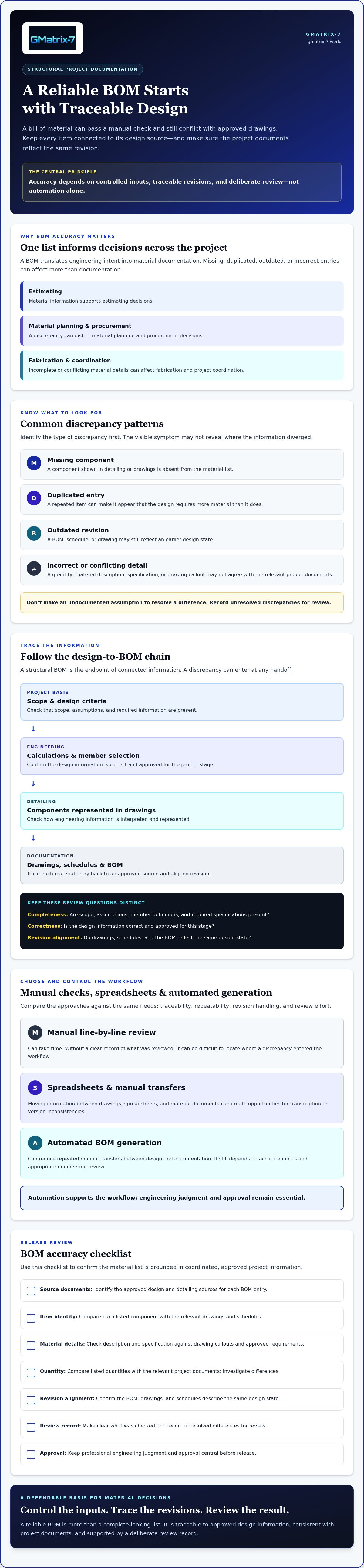
BOM accuracy checklist: verify each item before release
Use this sequence to make the review repeatable and auditable. Separate required checks, which apply to every release under your team’s process, from project-specific checks, which depend on the contract documents, design scope, or material requirements and may need confirmation.
How should reviewers check BOM line items?
- Confirm the review basis. Identify the approved design inputs and governing drawing and schedule revisions for this release. Check that the BOM is intended for the same documentation stage.
- Verify each line item. Compare its identifier, description, specification, and quantity with the relevant project documents. Confirm that units are consistent and descriptions distinguish similar items clearly.
- Look for list-level issues. Check for duplicate entries, omitted components, inconsistent units, and quantities that do not reconcile with the referenced drawings or schedules.
- Record discrepancies. For each issue, note the affected item, source document and revision, assigned owner, and resolution. Keep unresolved questions visible rather than silently changing an entry or assuming it is acceptable.
Apply required checks consistently, then flag project-specific requirements for confirmation. For example, check a material acceptance requirement or project-defined description convention against the applicable documents rather than assuming it applies universally.
What should the final release review confirm?
Before release, verify that the BOM and associated approval drawings reflect consistent revisions. Confirm that the reviews and project approvals required for that release stage are complete, and that discrepancies have been resolved and documented. If a discrepancy remains open, hold the release until the responsible reviewer determines the appropriate action.
Document the released version and communicate it through the team’s controlled process so recipients can distinguish current material information from superseded files. This final check strengthens the traceability needed for avoiding bill of material inaccuracies, especially when documentation changes during a project.
Teams assessing ways to improve this workflow can explore automated BOM generation as one way to reduce repeated manual transfers between structural design information and material documentation. Automation supports consistency, but it does not replace input verification or engineering review.
How structural design software can support more reliable BOMs
Generating material lists within a structural design and detailing workflow can reduce repeated manual transfers between design information and documentation. This gives teams an opportunity to keep material outputs aligned with the structural work they represent instead of rebuilding each list separately. It can support avoiding bill of material inaccuracies, but software depends on the information and controls provided. Incorrect inputs can still produce unreliable outputs.
Use software as a documentation control, not as a substitute for engineering judgment. Review the generated material list against its design basis, confirm that project-specific requirements are addressed, and complete the required engineering review and approval before release. The goal is a more consistent process, with human oversight at the decision points that matter.
What should a structural BOM software evaluation include?
Start with workflow fit. Confirm that the software supports the structural system your team designs and the documentation process used for the project. Ask how material outputs relate to design information and approval drawings, and how the team can review and update those outputs when the design changes.
Also confirm specific capabilities before relying on them. Verify supported material fields, revision controls, integrations, standards support, and implementation requirements for the software under consideration. These details vary by system and configuration. Do not assume automated generation includes every validation or revision function your team needs.
Where does GMatrix-7 fit in the documentation workflow?
GMatrix-7 provides structural design and detailing software through modules for Metal Building Systems (MBS, IBC), Open Web Steel Joists (OWSJ, SJI), including bar joists, and Light Gauge Steel (LGS, AISI). Its listed capabilities include automated bill of material generation and approval drawing generation. Used within the relevant structural workflow, these outputs can support coordinated material and drawing documentation, while engineering review remains essential.
For more context on automation’s role in engineering workflows, read Professional Structural Design Automation: The 2026 Engineering Outlook. To assess whether the available modules and documentation capabilities fit your team’s needs, explore GMatrix-7 structural design and detailing software.
Build BOM confidence into every release
Reliable material documentation depends on a disciplined workflow. Confirm that design inputs are complete, trace each BOM item to its approved source, and keep drawings and material lists aligned through revisions. Resolve discrepancies before release rather than allowing uncertain information to move downstream.
Manual checks and spreadsheets can support targeted reviews, while automated generation can reduce repeated transfers between design and documentation. Neither approach removes the need to verify inputs and review outputs. That balance is central to avoiding bill of material inaccuracies and maintaining engineering oversight.
GMatrix-7 generates structural approval drawings and material lists through software modules for MBS (IBC), OWSJ (SJI), and LGS (AISI) workflows. Teams evaluating documentation tools can consider how these capabilities fit their structural systems and review processes.
Explore GMatrix-7 structural design and detailing software to assess how its modules and documentation capabilities fit your team’s workflow.
Frequently Asked Questions
How do you prevent bill of material inaccuracies?
Prevent inaccuracies by controlling source information, checking each material entry against approved project documents, and holding release until discrepancies are resolved. Confirm the governing revisions before review, then verify item identifiers, descriptions, specifications, quantities, and units. Record the reviewer, source references, and resolution of each issue. Avoiding bill of material inaccuracies requires a repeatable process, whether the team checks items manually, uses spreadsheets, or generates lists with software.
What are the most common causes of BOM errors in structural projects?
Common causes include incomplete or incorrect design inputs, missed changes between revisions, and transcription mistakes during manual transfers. Errors can also arise when an item is omitted or duplicated, or when BOM descriptions, specifications, quantities, and drawing callouts do not agree. The point where a discrepancy enters depends on the project workflow. Tracing the affected entry through design information, detailing, and documents helps identify the source instead of just correcting the visible mismatch.
Can automated BOM generation eliminate material list errors?
No. Automated generation can reduce repeated manual transfers between design information and material documentation, but it can still reproduce incorrect or incomplete inputs. Reviewers should verify the design basis, compare generated items with relevant drawings and schedules, and confirm that the output reflects the intended revision. Automation supports consistency and repeatability. It does not replace engineering judgment, discrepancy resolution, or required approval before release.
How should a reviewer check a bill of materials against drawings?
First confirm that the BOM and drawings use the governing revisions for the review stage. Then compare each item’s identifier, description, specification, quantity, and units with the relevant drawing callouts and schedules. Look for missing or duplicated items and unclear descriptions. Document each discrepancy with its source reference, assigned owner, and resolution. If a difference remains unresolved, hold the release until the responsible reviewer determines the appropriate action.
What happens if a BOM does not match the current drawing revision?
A mismatch means the documents may describe different design states, so the team cannot confidently rely on the BOM until it establishes which revision governs. Depending on the discrepancy, estimating, material planning, procurement, or fabrication coordination may be affected. Identify the changed information, update or regenerate the material documentation as appropriate, and review it against the current drawings. Record the released version and communicate it through the team’s controlled document process.
When should a company use structural engineering software for BOM generation?
Consider structural engineering software when material lists are produced repeatedly from design and detailing information, revisions create reconciliation work, or manual transfers are difficult to control. Evaluate whether the software fits your structural system and documentation workflow, and verify its specific output and revision capabilities. GMatrix-7 offers MBS (IBC), OWSJ (SJI), and LGS (AISI) modules, with automated BOM and approval drawing generation. Engineering review remains necessary.


